 Sellka
Your records belong to your phone
Your sales, your stock and what your customers owe you are the history of your business. In Sellka they are kept on the phone in your hand. There is no account to make, no sign-in, and nobody who can lock you out of your own books.
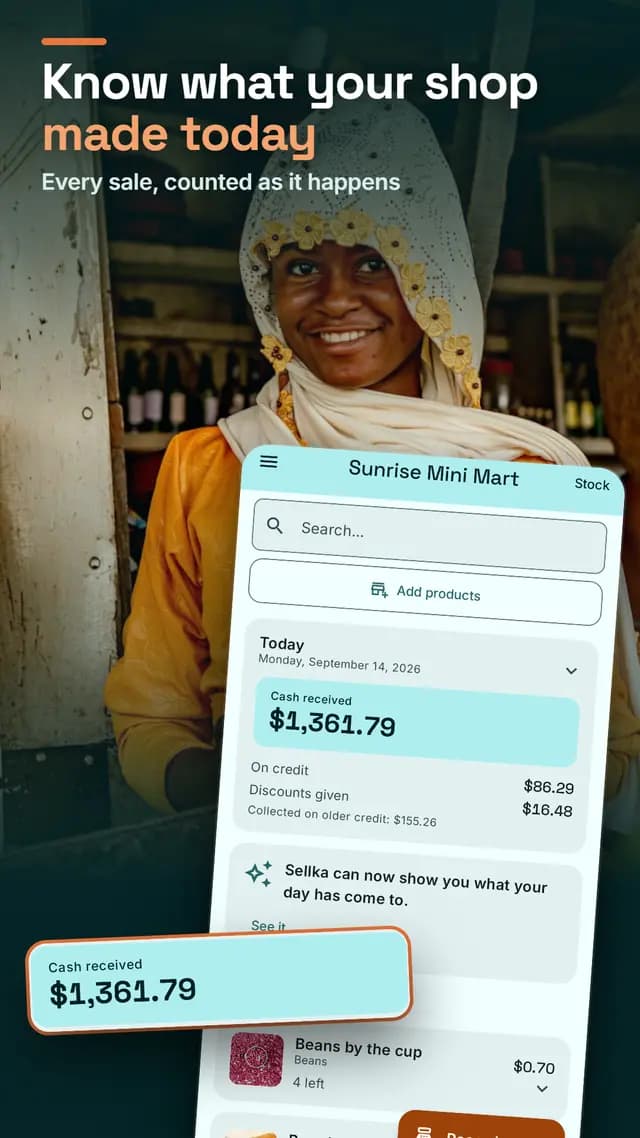
When a record keeping app closes
Shop owners have lived through this. An app they used every day, that kept their records on the company's computers behind an account, stopped working, and years of sales and debts went with it.
Sellka is built so that cannot happen to you:
- Everything is kept and worked out on your phone. It needs no internet, and nothing is sent anywhere on its own.
- There is no account. Nothing has to be switched on at a company's end for your records to open.
- You can take everything out. Save all your records as a file whenever you like, and keep it anywhere: a memory card, your email, another phone. No account or internet needed.
Keep a second copy
Your phone is the only copy until you make another, and a lost or broken phone takes its records with it. Sellka gives you two ways to keep a second copy, and you can use both:
- A file you keep. Open the menu, tap Your records, and save a copy. On a new phone, bring your records back from it.
- A copy in your own Google account. Sign in with Google and turn it on. It is off until you do. It copies when there is a connection and never slows down selling. You can turn it off or delete it from the app at any time.
Bringing records back replaces what is on the phone, so Sellka saves the current records first and lets you undo. Keeping your records safe, step by step.
Who can see your records
If you never turn the online copy on, your records are only on your phone and there is nothing for anyone to ask us for. If you turn it on, it is stored on Google's servers, locked to your Google account, and no other Sellka user can open it. We do not open shops' records, we do not sell them, and we do not give them to anyone. What leaves your phone.
A lock that can never cost you your records
Set a PIN to open Sellka, and use your fingerprint if your phone has one. The PIN locks the screen, not your records. If you forget it, turn the lock off, and every record stays.
Questions
© 2026 The NextTechTitan Team. Google Play and the Google Play logo are trademarks of Google LLC.